


USA warehouse now open. Our USA warehouse is now open! Low cost shipping and an ever growing variety make ordering from the US warehouse even better value!
This device plugs inbetween the Rx and the speed controller. It allows the user to program the BESC according to a series of LED indicators. it has buttons at the bottom so you can navigate through the menu and select the feature you want, then change it. Its very simple and is much easier than listening to jingles or a series of beeps.
This item is an excellent addition to your flight kit, especially with the new hard plastic case and lets you quickly change the BESCs settings in the field in a much shorter time and with greater assurance that what you have changed is correct and saved into the BESC.
No more black magic throttle stick programming! Throw away the manual, you wont need it anymore!
Sorry I replied to two answers asking similar questions last night and for some reason it posted my answer at the top instead of after the question. My reply's where for peter81 and petec2
Governer mode is set in the esc to control the head speed and keep it constant. So when flying if you have in governer mode and put a load on it by doing 3d maneuvers, for example, the head speed will be maintained to a constant level.
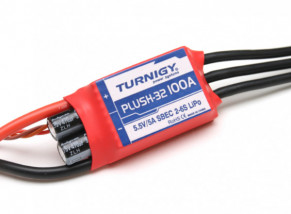
Can someone please tell me what the settings are for the TURNIGY ESC's using the NAZA Controller. I have the programming card for the ESC's. Thank you.
To add to Mayhem's answer (do credit him), if you find your motor stutters on startup and sometimes fails to start, try a different timing setting. In lament's terms, the timing tells the ESC how long it should wait for the next magnetic pole to be aligned with the coil before it fires another electric pulse. If a motor has more poles, the distance between the poles (in degrees) is less and the motor will require a faster timing. And vice verca. Adjust for best motor response and performance. Default value is usually fine.
I am having problem with my NAZA quadcopter motors firing up, they all initialize, but sometimes not in sync. They also will not start up with 4 esc's plugged in, if I do one esc at a time, that motor will work.... I read that I need to flash my ESC with a new firmware, im using Turnigy Plush 25a on a DJI Flamewheel.
I'm no quad expert sry. All I can say is that adjusting the timing really helped one of my motors that had issues getting a valid start, I kept having to set the throttle back and retry multiple times to get it started. The timing fixed that issue for me.
With this card, can I program the majority ESCs available in hobbyking, like turnigy and hobbyking ESCs??? If not, what is a general programming card? Thx
Compatible with a large number of ESCs yes, but not all ESCs are programmable. This card is meant for the Turnigy Plush series but many HK ESCs are compatible with the programmer. For example, I use the the HobbyKing ESC
PRODUCT ID: HK-SS30A-HW
It works perfectly with this programmer. The description for the HK-SS30A-HW tells you which programmer it is compatible with. If you want to be sure, you'll have to research each ESC to see if it can be programmed, and which programmer it is compatible with.
That's funny, because that is exactly what happened. I used it on a couple with limited success then tried it on a buddies and it melted down the esc and the programming card... Unless you know it will work don't try it,
Horse balls. You had the flight pack connected. There is no way the card can supply enough power to smoke the ESC. Look out for unicorns - their horns are sharp!
It is effectively for the ESC trust which I have make my request. Thank you for your answers, I shall not buy this model of card which is not compatible with them.
Hello,
My programming card doesn't work with my Turnigy plush ESC.
All led are always light on.
I have tested with four ESC with the same result.
How do to change it in warranty ?
Best regards,
Pierre
Its a way Easy'er way to program your esc. Some esc are really difficult to program. I use one and its a while lot faster then doing it with your control.
Its faster but its also safer than using the throttle input madness. Who knows what you change while going through all those beeps and throttle swings. I programmed an ESC once with the throttle inputs and that was enough. I immediately ordered the programmer. :-)
HEy MAYHEMNKMC I am setting up a quad with naza with 25a plush esc, my motors wont start but they make the chime, if i only plug in one esc that motor will start, but not all 4 at the same time. Does this card have a feature to delay the start of the card? I read that naza cannot start the same time as some aftermarket ESC like the plush 25a. Thank you
there isn't a delay but there is a soft start for things ling helicopters, that may be what you are looking for, But it sounds to me like you are not getting your flight controller armed.
Thank you to nlmbc and mena142 whom have kindly responded. I checked Ebay and for the $15 extra to acquire it there, I can go ahead and make my payment for a 50 item order from HK. The nature of the HK's back-ordered items is that they are pretty small items like control rods, stoppers and clevises and impossible to proceed without. I guess I don't mind splitting the order up but the prices are so good. You see my situation is one of complete newbie. I have nothing in my flight box, and the list of items to fill this out is huge. You know the learning curve is pretty steep. Man I hope I am good with the "Sticks", but there's always flight sim to solve that matter... Later guys
What other options other than re-flashing the firmware are there for a Plush seeing as how this BESC Programmer is back ordered regularly. If I try to change to a Multi-star series there are no program cards available either. I have been waiting to order for three weeks, and it is getting really old.
better off waiting for the programer vs changing to a different esc as the cost to do so could be high if you are using more than one in a rc.
Should be back in stock soon.
Plush is a rebranding of Hobby Wing ESCs and others. You can search for a Hobby Wing program card, it's fully compatible. Just search on the "electronic Bay"
Hi William I had this problem a while ago so make sure you plug the ESC into the battery then plug the ESC into the programmer give it about 15 seconds if this does not solve the problem get in contact with the hobbyking team thank Sam.
Chris I hate to say it but you have it backwards per instructions.
Plug esc into programer then power up the esc with a battery if you have a bec inabled or stand alone battery if not.
Read manual top right side will thel you how to plug it in to get it to work.
Just got this card and I can't get it to work. I read the instructions 12 times and tried it on 2 different 25 A Plush ESC's. any help is greatly appreciated.
Ok just a couple of pointers I found make sure you plug in to bec side with black wire neg red plus and white will be signal now power up esc with a battery and wait about 5 to 10 secs and you will see LEDs light up NOTE WILL NOT LIGHT UP STRIAGHT AWAY give 5 secs aleast if you done all that then problem with the broad
What are the actual refresh rates for the low, medium & high timing settings for a 30A plush esc? i.e. I need 400Hz what timming setting should I program? And where did you find the information for future reference?
THanks.
The timing is in relation to the motor timing, not refresh rate. Timing affects motor power and current draw, and some motors perform more efficiently or with higher performance at specific timing levels.
The timing is 100% independent of refresh rate. I assume you will be using this in a multicopter if you are concerned with refresh rate. I can confirm that these do in fact work well in a multicopter.
For a multicopter:
Brake: "Off"
Battery Type: "Li-ion" (if you're using a LiPo)
Cut-Off Type: "Soft-Cut"
Cut-Off Voltage: [PERSONAL CHOICE], rec. "Medium"
Start Mode: "Normal"
Timing Mode: "Medium"
Music: [PERSONAL CHOICE]
Governor Mode: "Off"
The new turnigy Plush ESCs have SiLabs microcontrollers that are not compatible with SimonK firmware. The Plush series perform well with stock firmware and 400hz update rate. I currently have SimonK flashed ESCs on my hexacopter and Plush on my Quadcopter. The biggest difference is noise. The SimonK flashed are much quieter with less high-pitch whine.
SimonK is not necessary or even compatible with Plush. If you want SimonK get the Hobbyking BlueSeries (Product ID: HKz30A) and an AVR programmer (Prod. ID: 9171000003) and flash them, the atmel adapter (Prod. ID 332000007) is a very nice tool that makes flashing very easy with no soldering, clips, or other things to go wrong . SimonK removes low-voltage cut and temperature monitoring, so be aware that you need some other way to track battery voltage if you go that route. Overall, SimonK is nice, but out-of-the-box Plush ESCs have proven themselves in many multicopters.
I bought this together with other ESCs and Motor. After basic installation and wanted to use this programming card to calibrate my Turnigy ESCs, it DOES NOT work at all! No light or any thing.
Please help or replace.
did you plug a battery in with the ESC?
Have you printed out the manual from the files section beside the price?
It is something simple you are missing so I would sudgest you read the instrutions and follow all of the steps.
The programming card does require power. If you are using an ESC without a BEC (Opto type) then you must plug in an additional plug into the port on the card labled Battery. Ensure proper wiring orientation when plugging in device. but also be carefull not to put too much power into the programming card. I think the max is 6 or so volts.
when you pluged in the battery was it after you pluged everything else in?
have you tried a seperate 6v battery in the battery only slot?
You may have a bad or disabled bec with that esc.
Hi nlmbc, thanks for guiding. I plug in the battery after setting up the ESC to the receiving ports of the card. I tried using several brand new Turnigy ESC that i bought and none worked. But I will try again using a separate stand alone 6v battery.
I used this card to program my new H-Wing Pentium 60 ESC. I've never had such a user-friendly programming card, EVER! No messing around trying to interface with a PC, and no ridiculous and time consuming tone-based programming. This approach is FAST and you can see exactly what you've set-up.
The instructions tell you clearly how to connect it all up - no guess-work. All the LEDs light-up in their CURRENT config, then you press the "up/down" button to scroll through each program item. Once you are at an item you want to change, you select the "left/right" button to change the config, then move on to the next item. Once complete, you press the "OK" button and your ESC is programmed! Absolutely brilliant!
This is what these support items should be like. Cost-effective, compact, easy to use, and totally effective. FAULTESS!
You might also get a real laugh at hearing your hot new outrunner playing tunes - the menu offers 16 different tunes, such as "Auld Lang Syne".
4 comments. Reply..
Overall Rating
Travis Wheelock
likes
Value
UNRATED
Quality
UNRATED
104 thumbs up!
Lovin' it! Can't believe how easy this card makes programming my Turnigy Plush 6A ESC. Bonus!! Works on my Volcano ESCs also! None of that BS of moving the throttle stick up, down, midways, counting beeps, what a hassle. Simple programming using the card, ESC, a battery hooked to the ESC, or a 4.8-6V receiver battery connected directly to the card for OPTO ESCs. Plays 15 different start-up tunes, or you can turn the music off all-together, which will save battery juice. You've read it in the reviews above, if you have an ESC that is compatible, do yourself a favor and get this card. $6.95. What a deal! Travis Wheelock 05/23/08
No comments. Reply..
Overall Rating
julian suarez
likes
Value
UNRATED
Quality
UNRATED
50 thumbs up!
es una maravilla, lo conectas al variador y programas lo que quieras en un momento, sin tener que estar con la emisora. es una buena compra y economica
2 comments. Reply..
Overall Rating
BILLAUDEL Jean-Philippe
likes
Value
UNRATED
Quality
UNRATED
42 thumbs up!
NEVER PLUG A BATTERY MORE THAN 6V direct on the card. Or your program card will be destroyed.
It's a easy to use card but alwais use the BEC include in the ESC. There is a plug to put an receiver external battery (4,8V only)
This card is low price and easy to use. It can program Supersimple ESC You cand found them www.link
8 comments. Reply..
Overall Rating
bcnmiguel
75 likes
Value
UNRATED
Quality
UNRATED
39 thumbs up!
Muy facil y rapido de usar. Sin leer ni las instrucciones. Por lo que vale no hay que complicarse la vida. No ocupa espacio y funciona con la bateria del modelo.
Copyright 2012 Hextronik Limited.
The HobbyKing.com®, OrangeRx, Turnigy, Durafly, nano-tech and other brand logos and names are trademarks of hexTronik Limited.
All rights reserved